


- Joined
- Threads
- 132
- Posts
- 414
This member is banned. Please avoid dealing with banned members.

This tutorial will teach you on how to create iterator to use in while loops form to identify that a certain element of a form is associated with another element. In the case of this tutorial, we use iterator to associate our text with the selected product's id.
Creating our Database
First step is to create our database.
1. Open phpMyAdmin.
2. Click databases, create a database and name it as test.
3. After creating a database, click the SQL and paste the below codes. See image below for detailed instruction.
Code:
CREATE TABLE `details` (
  `detailsid` INT(11) NOT NULL AUTO_INCREMENT,
  `purchaseid` INT(11) NOT NULL,
  `productid` INT(11) NOT NULL,
  `quantity` DOUBLE NOT NULL,
PRIMARY KEY(`detailsid`)
) ENGINE=InnoDB DEFAULT CHARSET=latin1;

CREATE TABLE `product` (
  `productid` INT(11) NOT NULL AUTO_INCREMENT,
  `product_name` VARCHAR(50) NOT NULL,
  `price` DOUBLE NOT NULL,
PRIMARY KEY(`productid`)
) ENGINE=InnoDB DEFAULT CHARSET=latin1;

CREATE TABLE `purchase` (
  `purchaseid` INT(11) NOT NULL AUTO_INCREMENT,
  `name` VARCHAR(50) NOT NULL,
  `total` DOUBLE NOT NULL,
  `date` datetime NOT NULL,
PRIMARY KEY(`purchaseid`)
) ENGINE=InnoDB DEFAULT CHARSET=latin1;

INSERT INTO `product` (`productid`, `product_name`, `price`) VALUES
(4, 'Laptop', 699.99),
(5, 'Desktop Pc', 999.99),
(6, 'Tablet', 299.99);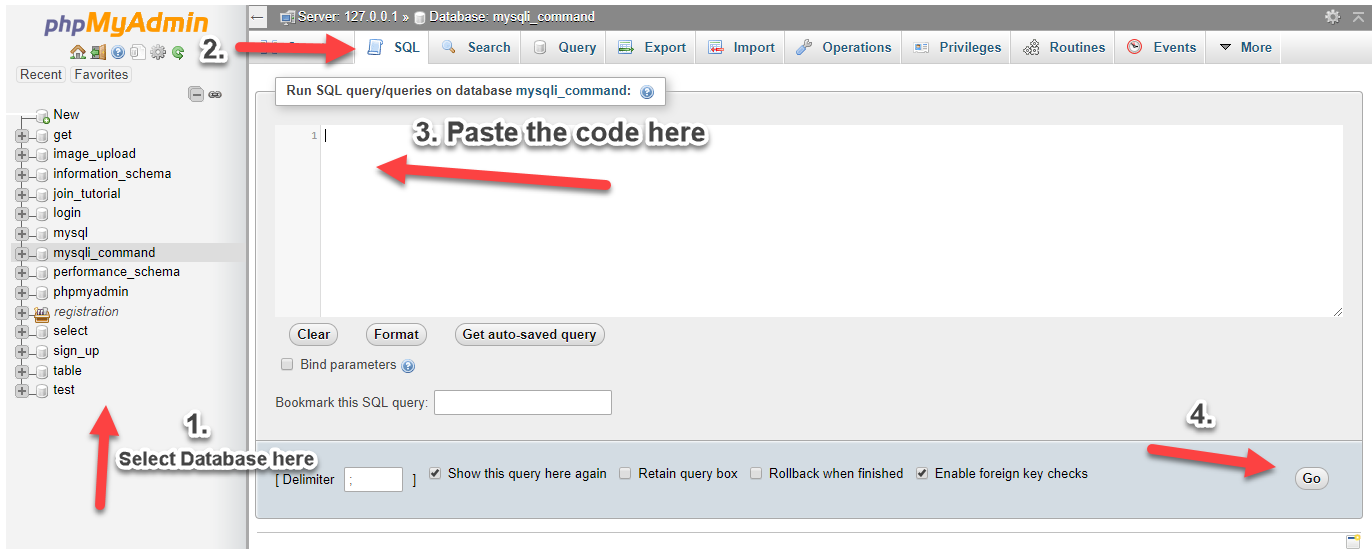
Creating our Connection
Next, we create our connection to our database. This will serve as the bridge between our forms and database. We name this as conn.php.
Code:
<?php

$conn = mysqli_connect("localhost","root","","test");
if (!$conn) {
    die("Connection failed: " . mysqli_connect_error());
}

?>Next, we create a list of our products and our purchase table. We included our iterator in our purchase product form.
Code:
<!DOCTYPE html>
<html>
<head>
    <title>Creating an Iterator for While Loop Forms in PHP/MySQLi</title>
    <script src="<a href="https://ajax.googleapis.com/ajax/libs/jquery/3.1.0/jquery.min.js"></script>
" rel="nofollow">https://ajax.googleapis.com/ajax/libs/jquery/3.1.0/jquery.min.js"></scri...</a>    <link rel="stylesheet" href="<a href="https://maxcdn.bootstrapcdn.com/bootstrap/3.3.6/css/bootstrap.min.css"" rel="nofollow">https://maxcdn.bootstrapcdn.com/bootstrap/3.3.6/css/bootstrap.min.css"</a> />
    <script src="<a href="https://maxcdn.bootstrapcdn.com/bootstrap/3.3.7/js/bootstrap.min.js"></script>
" rel="nofollow">https://maxcdn.bootstrapcdn.com/bootstrap/3.3.7/js/bootstrap.min.js"></s...</a>
    <style>
        input[type="checkbox"] {
        transform:scale(2, 2);
    }
    </style>

</head>
<body>
<div class="container">
    <div class="row">
        <div class="col-lg-12">
            <h2 style="color:blue">Product List</h2>
        </div>
    </div>
    <div class="row">
        <div class="col-lg-12">
            <form method="POST" action="purchase.php" class="form-inline">
                <table width="100%" class="table table-striped table-bordered table-hover">
                    <thead>
                        <th style="text-align:center"><input type="checkbox" id="checkAll"></th>
                        <th>Product Name</th>
                        <th>Price</th>
                        <th>Quantity</th>
                    </thead>
                    <tbody>
                        <?php
                            include('conn.php');
                            $query=mysqli_query($conn,"select * from product order by product_name asc");
                            //dis is our iterator
                            $iterate=0;
                            while($row=mysqli_fetch_array($query)){
                            ?>
                                <tr>
                                    <td align="center"><input type="checkbox" value="<?php echo $row['productid']; ?>||<?php echo $iterate; ?>" name="prodid[]"></td>
                                    <td><?php echo $row['product_name']; ?></td>
                                    <td><?php echo number_format($row['price'],2); ?></td>
                                    <td><input type="text" name="quantity_<?php echo $iterate; ?>" class="form-control"></td>
                                </tr>
                            <?php
                            $iterate++;
                            }
                        ?>
                    </tbody>
                </table>
            <input type="text" name="cname" class="form-control" placeholder="Customer Name" style="width:300px;" required> <button type="submit" class="btn btn-primary"><span class="glyphicon glyphicon-floppy-disk"></span> Save</button>
            </form>
        </div>
    </div>

    <div class="row">
        <div class="col-lg-12">
            <h2 style="color:blue">Purchases</h2>
        </div>
    </div>
    <div class="row">
        <div class="col-lg-12">
                <table width="100%" class="table table-striped table-bordered table-hover">
                    <thead>
                        <th class="hidden"></th>
                        <th>Date of Purchase</th>
                        <th>Customer</th>
                        <th>Total Purchase</th>
                        <th>View</th>
                    </thead>
                    <tbody>
                        <?php
                            include('conn.php');
                            $query1=mysqli_query($conn,"select * from purchase order by date desc");
                            while($row1=mysqli_fetch_array($query1)){
                            ?>
                                <tr>
                                    <td class="hidden"></td>
                                    <td><?php echo date('M d, Y h:i A', strtotime($row1['date'])); ?></td>
                                    <td><?php echo $row1['name']; ?></td>
                                    <td><?php echo number_format($row1['total'],2); ?></td>
                                    <td>
                                        <a href="#show<?php echo $row1['purchaseid']; ?>" data-toggle="modal" class="btn btn-primary btn-sm"><span class="glyphicon glyphicon-fullscreen"></span> Product List</a>
                                        <?php include('modal.php'); ?>
                                    </td>
                                </tr>
                            <?php
                            }
                        ?>
                    </tbody>
                </table>
        </div>
    </div>
</div>
<script>
$(document).ready(function(){
    $("#checkAll").change(function () {
    $("input:checkbox").prop('checked', $(this).prop("checked"));
    });
});
</script>
</body>
</html>This is our purchase code. It will insert the products selected to our purchase table.
Code:
<?php
    include('conn.php');
    if(isset($_POST['prodid'])){

        $customer=$_POST['cname'];
        mysqli_query($conn,"insert into purchase (name, date) values ('$customer', NOW())");
        $purchase=mysqli_insert_id($conn);

        $total=0;

        foreach($_POST['prodid'] as $product):
        $proinfo=explode("||",$product);
        $productid=$proinfo[0];
        $iterate=$proinfo[1];
        $pquery=mysqli_query($conn,"select * from product where productid='$productid'");
        $prow=mysqli_fetch_array($pquery);

        if (isset($_POST['quantity_'.$iterate])){
            $subt=$prow['price']*$_POST['quantity_'.$iterate];
            $total+=$subt;
            mysqli_query($conn,"insert into details (purchaseid, productid, quantity) values ('$purchase', '$productid', '".$_POST['quantity_'.$iterate]."')");

            header('location:index.php');

        }
        endforeach;

        mysqli_query($conn,"update purchase set total='$total' where purchaseid='$purchase'");
    }
    else{
        ?>
        <script>
            window.alert('Please select a product');
            window.location.href='index.php';
        </script>
        <?php
    }
?>Lastly, we create our modal in showing the list of products in a purchase.
You must reply to see the hidden content. Consider upgrading your account to increase your reply limit.


