


- Joined
- Threads
- 132
- Posts
- 414
This member is banned. Please avoid dealing with banned members.

This tutorial will show you how to insert data into mysql database using PHP, MySQLi, AJAX and JQuery. You might wonder why use AJAX and JQuery when you can insert into database using PHP and MySQLi. Yes, but with the use of AJAX and JQuery, you don't need to reload the page in doing an action. This tutorial will not give you a good design but will give you idea on the topic.
Creating our Database
First, we're going to create our database. This will store the data that we are going to insert.
1. Open phpMyAdmin.
2. Click databases, create a database and name it as "ajax_insert.
3. After creating a database, click the SQL and paste the below code. See image below for detailed instruction.
Code:
CREATE TABLE `post` (
  `postid` INT(11) NOT NULL AUTO_INCREMENT,
  `post_text` VARCHAR(200) NOT NULL,
  `date_time` datetime NOT NULL,
PRIMARY KEY(`postid`)
) ENGINE=InnoDB DEFAULT CHARSET=latin1;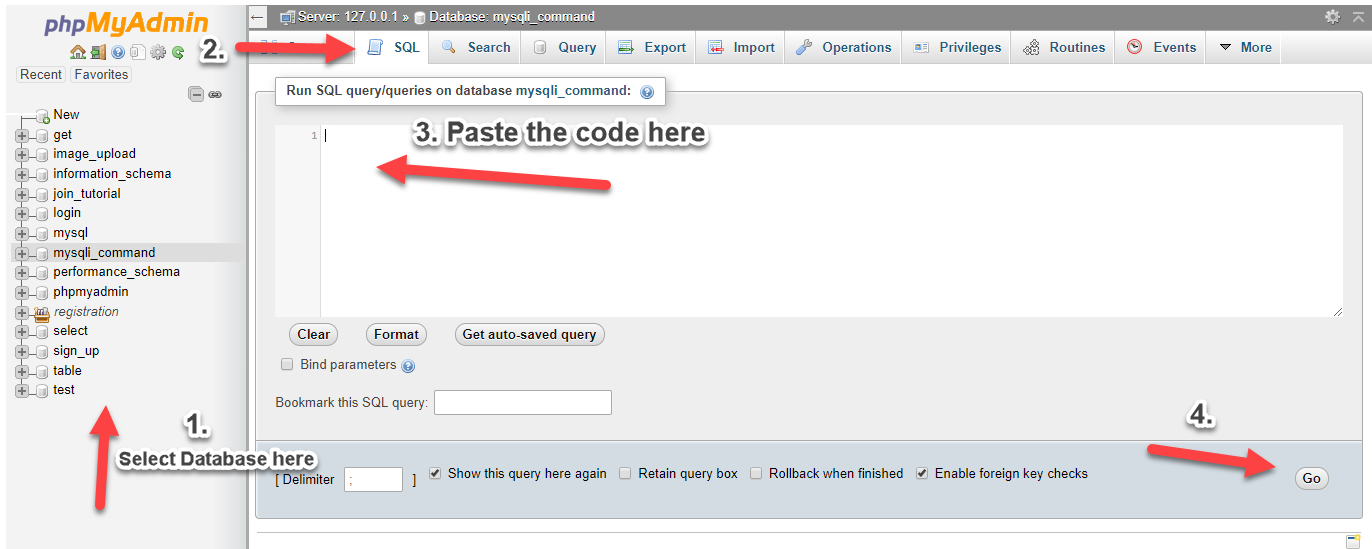
Creating our Connection
Next step is to create a database connection and save it as "conn.php". This file will serve as our bridge between our form and our database. To create the file, open your HTML code editor and paste the code below after the tag.
Code:
<?php

//MySQLi Procedural
$conn = mysqli_connect("localhost","root","","ajax_insert");
if (!$conn) {
    die("Connection failed: " . mysqli_connect_error());
}

?>
Creating our Form with our Output
Next, we create our add form and a page to output our added data. We name this as "index.php". Also included in this page, the location of our jquery script which will be included in the file of this tutorial.
Code:
<!DOCTYPE html>
<html lang = "en">
<head>
    <meta charset = "UTF-8" name = "viewport" content = "width=device-width, initial-scale=1"/>
    <title>Inserting Data into MySQL Database using PHP, AJAX, JQuery</title>
</head>
<body>
    <h2>What's on your Mind?</h2>
    <div  id = "post_form">
        <form>
            <textarea id = "post" class = "form-control"></textarea><br>
            <button type = "button" id = "add_post">POST</button>
        </form>
        <br>
    </div>
    <div id = "result"></div>
</body>
<script src = "jquery-3.1.1.js"></script>
<script type = "text/javascript">
    $(document).ready(function(){
    displayResult();
    /*    ADDING POST    */

        $('#add_post').on('click', function(){
            if($('#post').val() == ""){
                alert('Please enter something first');
            }else{

                $post = $('#post').val();

                $.ajax({
                    type: "POST",
                    url: "add_post.php",
                    data: {
                        post: $post,

                    },
                    success: function(){

                        displayResult();
                    }
                });
            }
        });
    /*****    *****/
    });

    function displayResult(){
        $.ajax({
            url: 'add_post.php',
            type: 'POST',
            async: false,
            data:{
                res: 1
            },
            success: function(response){
                $('#result').html(response);
            }
        });
    }

</script>
</html>Last, we create our add code which will add our inputted data into our database. We name this as "add_post.php".
Code:
<?php
    include ('conn.php');
    if(isset($_POST['post'])){
        $post = addslashes($_POST['post']);
        mysqli_query($conn,"insert into `post` (`post_text`, `date_time`) values ('$post', NOW())") or die(mysqli_error());
    }
?>
<?php
    if(isset($_POST['res'])){
    ?>
    <?php
        $query=mysqli_query($conn,"select * from `post` order by `date_time` desc") or die(mysqli_error());
        while($row=mysqli_fetch_array($query)){
    ?>
        <div>
            Date: <?php echo date('M-d-Y h:i A',strtotime($row['date_time'])); ?> <br>
            Post: <?php echo $row['post_text']; ?>
        </div>
        <br>
    <?php
        }
    }
?>
You must reply to see the hidden content. Consider upgrading your account to increase your reply limit.


