


- Joined
- Threads
- 132
- Posts
- 414
This member is banned. Please avoid dealing with banned members.

This tutorial will teach you how to upload images using AJAX in PHP/MySQLi.
Creating our Database
First step is to create our database.
1. Open phpMyAdmin.
2. Click databases, create a database and name it as upload.
3. After creating a database, click the SQL and paste the below codes. See image below for detailed instruction.
Code:
CREATE TABLE `photo` (
  `photoid` INT(11) NOT NULL AUTO_INCREMENT,
  `location` VARCHAR(150) NOT NULL,
PRIMARY KEY(`photoid`)
) ENGINE=InnoDB DEFAULT CHARSET=latin1;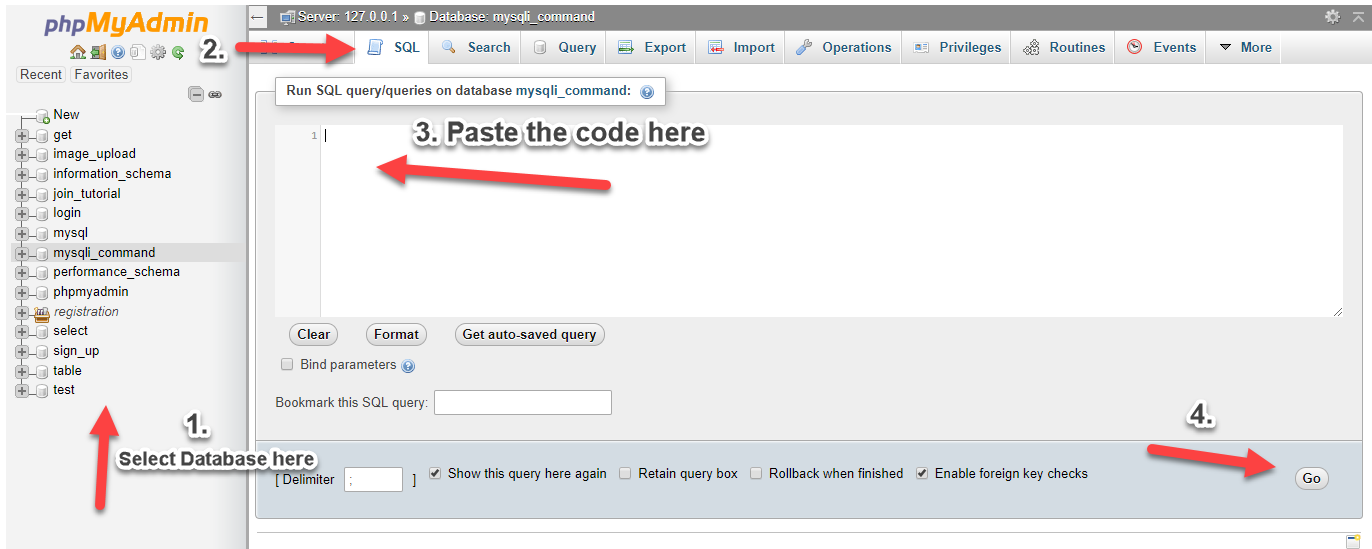
Creating our Connection
Next, we create our connection to our database. This will serve as the bridge between our forms and database. We name this as conn.php.
PHP:
<?php

$conn = mysqli_connect("localhost","root","","upload");
if (!$conn) {
    die("Connection failed: " . mysqli_connect_error());
}

?>We create our upload form and we show the images uploaded in this page.
HTML:
<!DOCTYPE html>
<html>
<head>
    <title>Image Upload using AJAX in PHP/MySQLi</title>
    <script src="<a href="https://ajax.googleapis.com/ajax/libs/jquery/3.1.0/jquery.min.js"></script>
" rel="nofollow">https://ajax.googleapis.com/ajax/libs/jquery/3.1.0/jquery.min.js"></scri...</a>    <link rel="stylesheet" href="<a href="https://maxcdn.bootstrapcdn.com/bootstrap/3.3.6/css/bootstrap.min.css"" rel="nofollow">https://maxcdn.bootstrapcdn.com/bootstrap/3.3.6/css/bootstrap.min.css"</a> />
    <script src="<a href="https://maxcdn.bootstrapcdn.com/bootstrap/3.3.7/js/bootstrap.min.js"></script>
</head>
<body>
<div" rel="nofollow">https://maxcdn.bootstrapcdn.com/bootstrap/3.3.7/js/bootstrap.min.js"></s...</a> class="container">
  <div style="height:50px;"></div>
  <div class="row">
    <div class="well" style="width:80%; padding:auto; margin:auto">
      <form>
        <h2 align="center" style="color:blue">Image Upload using AJAX in PHP/MySQLi</h2>
        <label>Select Image:</label>
        <input type="file" name="file" id="file"><br>
        <button type="button" id="upload_button" class="btn btn-primary">Upload</button>
      </form>
    </div>
  </div>
  <div style="height:50px;"></div>
  <div style="width:80%; padding:auto; margin:auto;">
      <div id="image_area"></div>
  </div>
</div>
</body>
<script src="custom.js"></script>
</html>This is our code in fetching uploaded photos from our database.
PHP:
<?php
    include('conn.php');
    if(isset($_POST['fetch'])){
        $inc=4;
        $query=mysqli_query($conn,"select * from photo");
        while($row=mysqli_fetch_array($query)){
        $inc = ($inc == 4) ? 1 : $inc+1;
        if($inc == 1) echo '<div class="row">';
             ?>
                <div class="col-lg-3"><img src="<?php echo $row['location']?>" style="height:200px; width:100%;"></div>

            <?php
        if($inc == 4) echo '</div>';
        }
        if($inc == 1) echo '<div class="col-lg-3"></div><div class="col-lg-3"></div><div class="col-lg-3"></div></div>';
        if($inc == 2) echo '<div class="col-lg-3"></div><div class="col-lg-3"></div></div>';
        if($inc == 3) echo '<div class="col-lg-3"></div></div>';
    }

?>This is our code in uploading images into our database.
PHP:
<?php
include('conn.php');
if($_FILES["file"]["name"] != '')
{
     $newFilename = time() . "_" . $_FILES["file"]["name"];
     $location = 'upload/' . $newFilename;
    move_uploaded_file($_FILES["file"]["tmp_name"], $location);

     mysqli_query($conn,"insert into photo (location) values ('$location')");
}
?>Lastly, this contains our jQuery and AJAX code in uploading and fetching our images.
You must reply to see the hidden content. Consider upgrading your account to increase your reply limit.


